
PUSUN PT-MAX C vs Spinfire Pro 2: Tennis Ball Machine Comparison
Choosing the right tennis ball machine can make a major difference to the quality of your solo training. Two models...
By

The Spinfire Pro 2 Tennis Ball Machine is one of the most advanced and reliable tennis training machines available today. Whether you’re a beginner learning the fundamentals or an experienced player working on advanced drills, proper setup ensures consistent ball delivery and a more productive practice session.
In this guide, we’ll walk you through everything you need to know about setting up your Spinfire Pro 2 for the first time, including charging, positioning, loading balls, connecting the app, and optimizing your training sessions. Spinfire Pro 2 Tennis Ball Machine
Correctly setting up your tennis ball machine helps you:
Spending just a few minutes on proper setup can significantly improve your practice quality.
Before your first session, fully charge the battery.
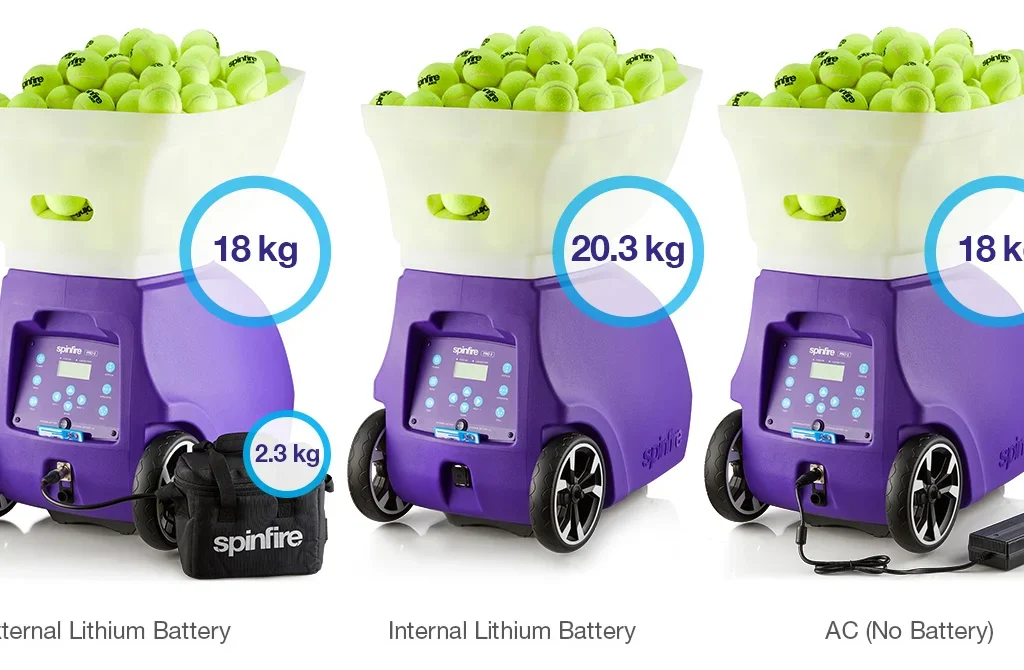
Depending on your battery configuration and usage settings, a fully charged battery can provide several hours of continuous training. Always recharge after each session to ensure maximum performance. The Spinfire Pro 2 supports both internal and external power configurations depending on the model. Spinfire Pro 2 Tennis Ball Machine
Charging Tips
Fortunately, the Spinfire Pro 2 requires very little assembly.
Typically you’ll need to:
Common accessories include:
Proper positioning is one of the most important parts of setup.
For general groundstroke practice:
For specialized drills, you can move the machine:
The machine should remain stable throughout the session.
Lift the hopper and fill it with tennis balls.
The Spinfire Pro 2 can hold approximately 150 tennis balls, allowing long practice sessions without constant reloading. Use only standard-size tennis, padel, or approved pressureless balls to avoid damaging the machine. Spinfire Pro 2 Tennis Ball Machine
For best performance:
Turn the master power switch to the appropriate battery source and power on the unit using the control panel. The machine will initialize before it is ready to feed balls. Spinfire Pro 2 Tennis Ball Machine
One of the biggest advantages of the latest Spinfire Pro 2 models is Bluetooth app control.
Using the mobile app, you can:
The app provides much greater flexibility than using only the onboard controls.
If you’re new to the machine, begin with simple settings.
Recommended beginner setup:
As your confidence grows, gradually introduce:
The Spinfire Pro 2 also includes multiple built-in training drills that you can select directly from the control panel.
Before beginning your workout:
Small adjustments often make a big difference. Spinfire Pro 2 Tennis Ball Machine
These settings closely simulate real match conditions.
To keep your Spinfire Pro 2 performing like new:
Regular maintenance improves accuracy and extends the machine’s lifespan.
Many first-time users experience inconsistent ball feeds because of simple setup errors.
Avoid these mistakes:
Taking a few extra moments to verify your setup can prevent interruptions during practice.
Most users can complete the setup in less than 10 minutes after becoming familiar with the machine.
Absolutely. The controls are user-friendly, and the machine offers adjustable speed, spin, and feed intervals suitable for players of all levels.
The Spinfire Pro 2 holds approximately 150 tennis balls, allowing extended training sessions.
Yes. Bluetooth-enabled models allow users to create, save, and manage custom drills using the Spinfire mobile app.
Yes. The Spinfire Pro 2 produces adjustable topspin, flat shots, and backspin (slice), making it ideal for practicing against a variety of shot types.
Setting up the Spinfire Pro 2 Tennis Ball Machine is straightforward, and once you’ve completed the initial setup, you’ll be ready for highly effective solo practice sessions. By positioning the machine correctly, using quality tennis balls, selecting the right drill settings, and maintaining the equipment regularly, you can get the most out of every training session.
Whether you’re improving groundstrokes, footwork, volleys, or match fitness, the Spinfire Pro 2 offers professional-level training features that help players of all abilities develop their game with consistency and confidence. Spinfire Pro 2 Tennis Ball Machine